Go Back
Report Abuse
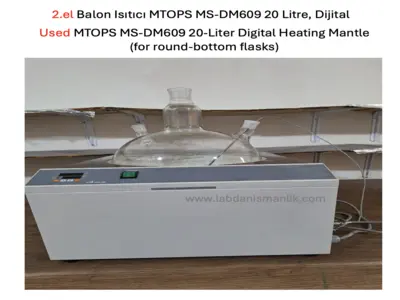
2.el Balon Isıtıcı MTOPS MS-DM609 20 Litre, Dijital
2.el Balon Isıtıcı MTOPS MS-DM609 20 Litre, Dijital–
2.el Balon Isıtıcı MTOPS MS-DM609 20 Litre, Dijital-
2.el Balon Isıtıcı MTOPS MS-DM609 20 Litre, Dijital
2.el Balon Isıtıcı MTOPS MS-DM609 20 Litre, Dijital–
2.el Balon Isıtıcı MTOPS MS-DM609 20 Litre, Dijital-

2.el Balon Isıtıcı MTOPS MS-DM609 20 Litre, Dijital

Description

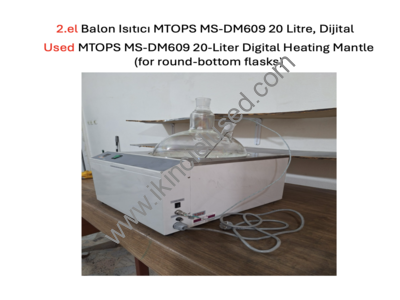
MTOPS MS-DM609 20 Litre (20.000 ml) Dijital
PID Balon Isıtıcı Manto, Mantolu ısıtıcı
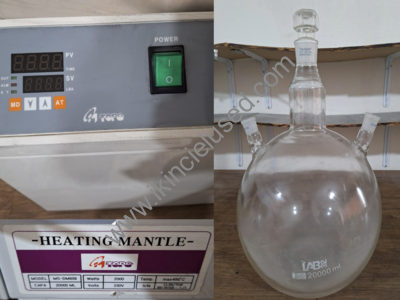
2000W, Maks. 450°C, dijital PID kontrollü
Orijinal harici daldırma sıcaklık probu (rodajlı cam adaptörlü) dahildir.
Ayrıca;
2 Adet Çalışkan marka 20.000 ml (20 L) 3 boyunlu borosilikat reaksiyon balonu (NS 45/40 – 29/32, kapaklı)
Not: Balonlar ekstra ücrete tabidir

SAHİBİNDEN SATIŞLI İLAN
SATICI :  Doç. Dr. İbrahim Karteri
TELEFON :  0538 497 1956

Kullanıcı Bilgisi

admin

Member since 6 yıl ago
View Profile

There are no reviews yet.

Author Info

admin

Member since 6 yıl ago
View Profile

Nasıl Ürün Eklerim?

“Kayıt ol” bölümünden kayıt olup, ürün ekleyerek kullanıcı hesabı açabilirsiniz.

Kullanıcılar mail adresi ve şifresi ile “Giriş Yap” bölümünden sisteme giriş yapmış olurlar.

“Hesabım” bölümünden “Kontrol Panelinize” ulaşıp ürün/ürünlerin eklemesi yapabilir ve ürün/ürünlerin kontrolünü sağlayabilirler.


NOT: İkinciel=Used sisteme kayıt olduktan sonra 24 saat içinde incelenip, uygun görüldüğü takdirde onaylanıp yayınlanacaktır.

How do I add a product?

You can open a user account by registering and adding products from the “Register” section.

Users log into the system with their e-mail address and password from the “Login” section.

They can access your “Control Panel” from the “My Account” section, add the product/products and control the product/products.

Recent Posts

Categories

Nasıl Ürün Eklerim?

“Kayıt ol” bölümünden kayıt olup ürün ekleyerek kullanıcı hesabı açabilirsiniz.

Kullanıcılar mail adresi ve şifresi ile “Giriş Yap” bölümünden sisteme giriş yapmış olurlar.

“Hesabım” bölümünden “Kontrol Panelinize” ulaşıp ürün/ürünlerin eklemesi yapabilir ve ürün/ürünlerin kontrolünü sağlayabilirler.

How do I add a product?

You can open a user account by registering and adding products from the “Register” section.

Users log into the system with their e-mail address and password from the “Login” section.

They can access your “Control Panel” from the “My Account” section, add the product/products and control the product/products.

Takvim

Kasım 2026
P S Ç P C C P
 1
2345678
9101112131415
16171819202122
23242526272829
30